Free invoice generator
Fill in your details, add line items, and download a clean professional PDF invoice — free, with no signup, no watermark, and nothing you type ever leaving your browser.
How it works
- Enter your business, your client, and the invoice details — everything stays on your device, so client data is never uploaded anywhere.
- Add line items with quantity and rate; tax and the total calculate live as you type.
- Download the finished PDF free — no watermark, no signup — or email it to yourself to forward.
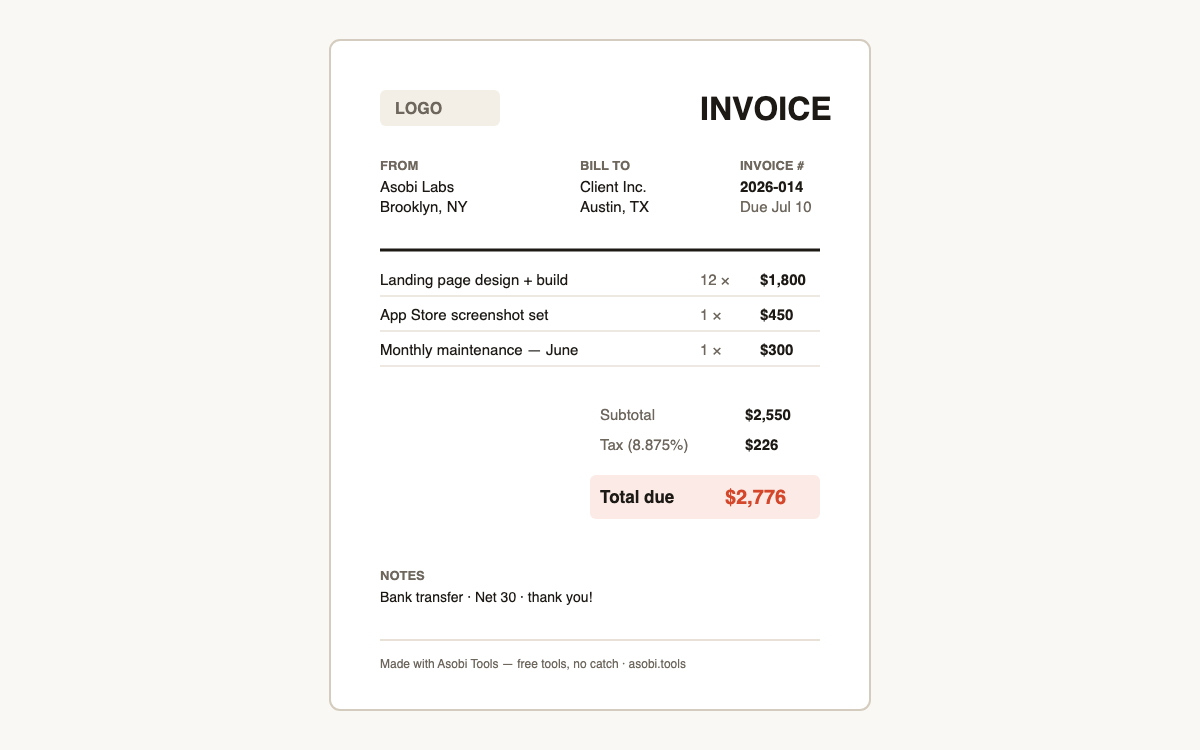
How do I make an invoice for free?
A proper invoice needs your details, the client's, a unique number, dates, line items, and the total — and you can have all of that as a PDF in about two minutes without creating any account:
- Fill in your business details and your client's billing details above.
- Give the invoice a number and set the issue and due dates.
- Add a line per service or product with quantity and rate — tax and total calculate automatically.
- Download the PDF (or email it to yourself) and send it to your client.
What must an invoice legally include?
Requirements vary by country, but the near-universal core is: both parties' names and addresses, a unique sequential invoice number, the issue date, a description of goods or services with amounts, any tax shown separately, and the total due with payment terms. US freelancers generally don't add sales tax on services; EU businesses typically must show VAT details — when in doubt, ask your accountant once and reuse the format.
Is it safe to put client details into an online invoice generator?
Only if the generator doesn't upload them — most "free" invoice sites are SaaS funnels that store your client list on their servers from the first keystroke. This one is different by architecture: the PDF is assembled in your browser, nothing you type is transmitted, and you can verify that in your browser's network tab while you use it.
Why is this invoice generator free with no signup?
Because there's nothing to pay for: the tool runs on your device, so there are no server costs to recover and no reason to wall the download. Most competitors gate the PDF behind an account because the account is the product — your email enters a sales funnel for their paid plan. Asobi Tools makes its tools free and optional-everything; that's the whole brand.
Which currencies does it support?
Eight currencies cover the vast majority of freelance invoicing, each with correct symbol formatting on the PDF:
| Currency | Symbol | Common use |
|---|---|---|
| USD / CAD / AUD | $ · C$ · A$ | North America, Australia |
| EUR / GBP | € · £ | Europe, UK |
| JPY / INR / BRL | ¥ · ₹ · R$ | Japan, India, Brazil |
Frequently asked questions
Is this invoice generator really free?
Yes — free with no signup, no watermark, no invoice limit, and no trial that expires. Asobi Tools runs in your browser, so there's no cost for us to recover. Free tools, no catch.
Is my client's data uploaded anywhere?
No. The invoice is built entirely on your device — names, addresses, and amounts never leave your browser. You can verify it in your browser's network tab. If you email yourself the PDF, only that file is sent.
Can I add my logo?
Yes — drop a PNG or JPG and it's placed at the top of the invoice, sized automatically. The logo is embedded into the PDF on your device like everything else.
Does the PDF have a watermark?
No. The invoice you download is completely clean and professional — no branding stamped over it, no 'upgrade to remove' footer. There's a small made-with line in the footer margin, nothing on your content.
How should I number my invoices?
Any unique, sequential scheme works: 2026-001, 2026-002 is the most common for freelancers, or INV-0042 if you prefer a running counter. Sequential numbering matters for your bookkeeping and is legally required in many countries — pick a scheme and never reuse a number.
Can I do taxes like VAT or GST?
Yes — set the tax percentage and it's calculated and shown as its own line, which is how VAT/GST/sales tax should appear. Add your VAT or tax ID in the notes field if your jurisdiction requires it on invoices.
Can I save an invoice and edit it later?
There are no accounts, so nothing is stored — by design. For repeat invoices, keep the downloaded PDF as your reference and regenerate with updated dates and numbers; the form takes under a minute once your details are familiar.
What payment terms should I use?
Net 30 (due in 30 days) is the default convention, but freelancers increasingly use Net 14 or due-on-receipt — shorter terms get paid faster. State the term in the notes along with how to pay (bank transfer, PayPal, etc.); an invoice without payment instructions is the #1 cause of late payment.
Who built this?
Asobi Tools is built by Asobi Labs, an independent software studio in Brooklyn that invoices its own clients with this exact tool. Everything on asobi.tools is free, signup-less, and runs entirely in your browser.