Influencer media kit generator
Fill in your stats, drop in a photo, and download a clean one-page media kit PDF — no Canva login, no template hunting, no watermark, and nothing you type leaves your browser.
How it works
- Fill in your name, positioning line, three headline stats, and a short bio — the form is the template, so there's nothing to design.
- Add a photo and your accent color if you want it on-brand; everything stays on your device.
- Preview it, then download the one-page PDF or email it to yourself — free, no watermark.
What goes in an influencer media kit?
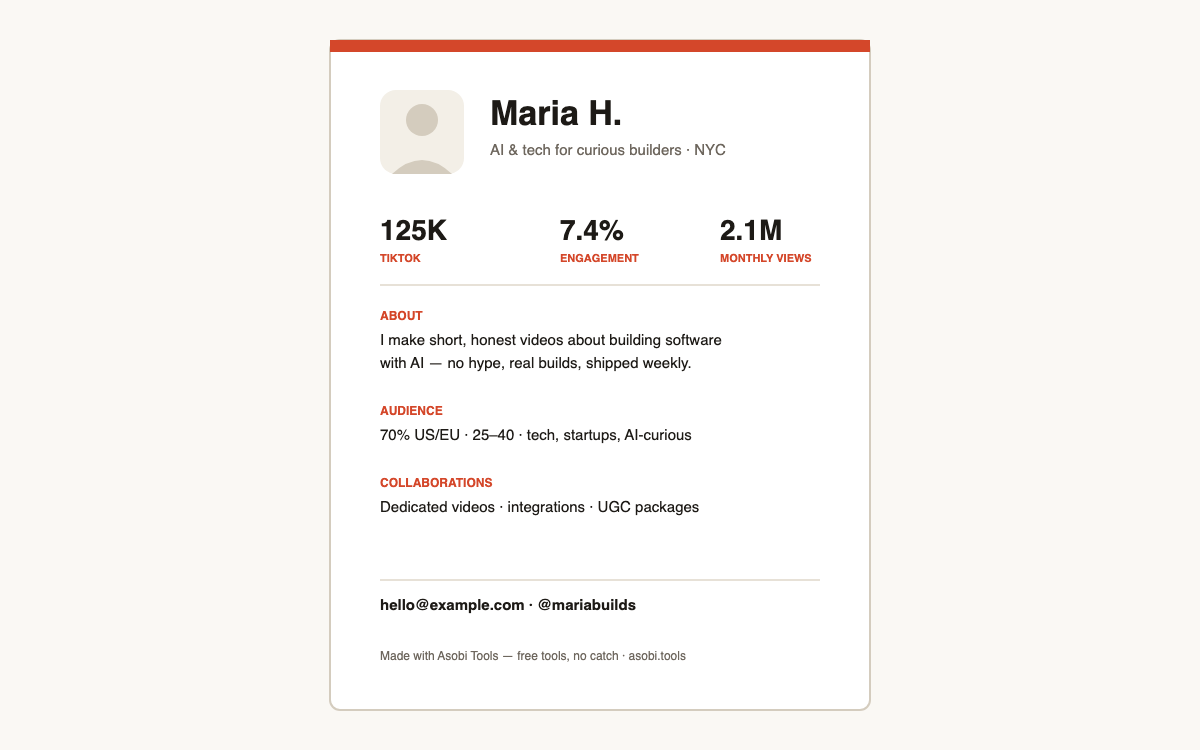
Brands skim media kits in under a minute, so one page with the right six elements beats a ten-page deck. The working checklist:
- Who you are: name, photo, and a one-line positioning statement.
- Headline stats: followers, engagement rate, and monthly views — your three strongest numbers.
- A 2–3 sentence bio that says what you make and who watches it.
- Audience snapshot: top geographies, age range, and interests.
- Collaboration types you offer (dedicated posts, integrations, UGC).
- Contact details — and ideally past brand work if you have it.
Do I need a media kit as a small creator?
Yes — arguably more than big creators do. A brand considering a 1M-follower account has public proof everywhere; a brand considering your 8,000-follower account is taking a chance, and a tight one-pager with real engagement numbers is what de-risks you. Nano and micro creators with professional kits routinely out-close bigger accounts that answer DMs with a paragraph.
What's the difference between a media kit and a rate card?
The media kit sells you — who you are, your audience, your numbers. The rate card prices you — packages and line items like usage rights. Keeping them separate is deliberate: you send the media kit early to start conversations, and the rate card after interest is real, so your prices never anchor the first impression. This generator pairs with the rate card builder for exactly that flow.
Which stats should I put in a media kit?
Lead with the three numbers that predict campaign performance, not vanity totals:
| Stat | Why brands care |
|---|---|
| Engagement rate | Predicts action better than any follower count |
| Average views per post | What the brand actually buys |
| Audience geography + age | Determines if your audience can even convert |
Can I make a media kit without Canva?
Yes — that's the point of this generator. Canva's media kit templates require an account, push Pro upsells, and still leave you doing layout work. Here the form is the template: type your details, get a designed one-page PDF, done. Nothing you enter is uploaded, and the result has no watermark.
Frequently asked questions
Is this media kit generator really free?
Yes — free, no signup, no watermark, no Pro tier. Asobi Tools runs in your browser, so there's nothing for us to host and nothing to charge for. Free tools, no catch.
Is my photo or bio uploaded anywhere?
No. The PDF is assembled entirely on your device — your photo, stats, and contact details never leave your browser. The only exception is if you choose to email the finished kit to yourself.
How long should a media kit be?
One page. Brand managers see dozens of kits a week and skim each for under a minute — a single confident page with your best numbers reads as professional; a long deck reads as padding. This generator is deliberately one-page-only.
What if I don't have brand deals yet?
Leave the past-brands field empty — the kit simply omits that line. Lead with engagement rate and audience fit instead; every creator's first kit was brand-less, and a strong engagement number is the better signal anyway.
Should I put my rates in the media kit?
Usually no. Keep the kit about you and your audience, and send rates separately once a brand shows real interest — it gives you room to price per campaign. When asked, generate a matching rate card with the Asobi Tools brand deal calculator.
What photo works best?
A clear, friendly headshot — the same one you use on your profiles, so brands recognize you instantly. A square crop around 400×400 or larger looks sharp in the PDF. Logos work too if you're a faceless channel.
Can I update my kit later?
Anytime — there's no account and nothing stored, so just come back, retype, and regenerate. A good habit is refreshing your kit monthly with current stats so you're never pitching with stale numbers.
What format is the result?
A standard one-page PDF (US Letter) that attaches cleanly to emails and DMs, opens everywhere, and prints well. PDF beats a Canva link in pitches — no permissions, no 'view in browser', just your kit.
Who built this?
Asobi Tools is built by Asobi Labs, an independent Brooklyn studio run by a working creator who pitches brands with these exact tools. Everything here is free, signup-less, and stays in your browser.